 Epic's Echo
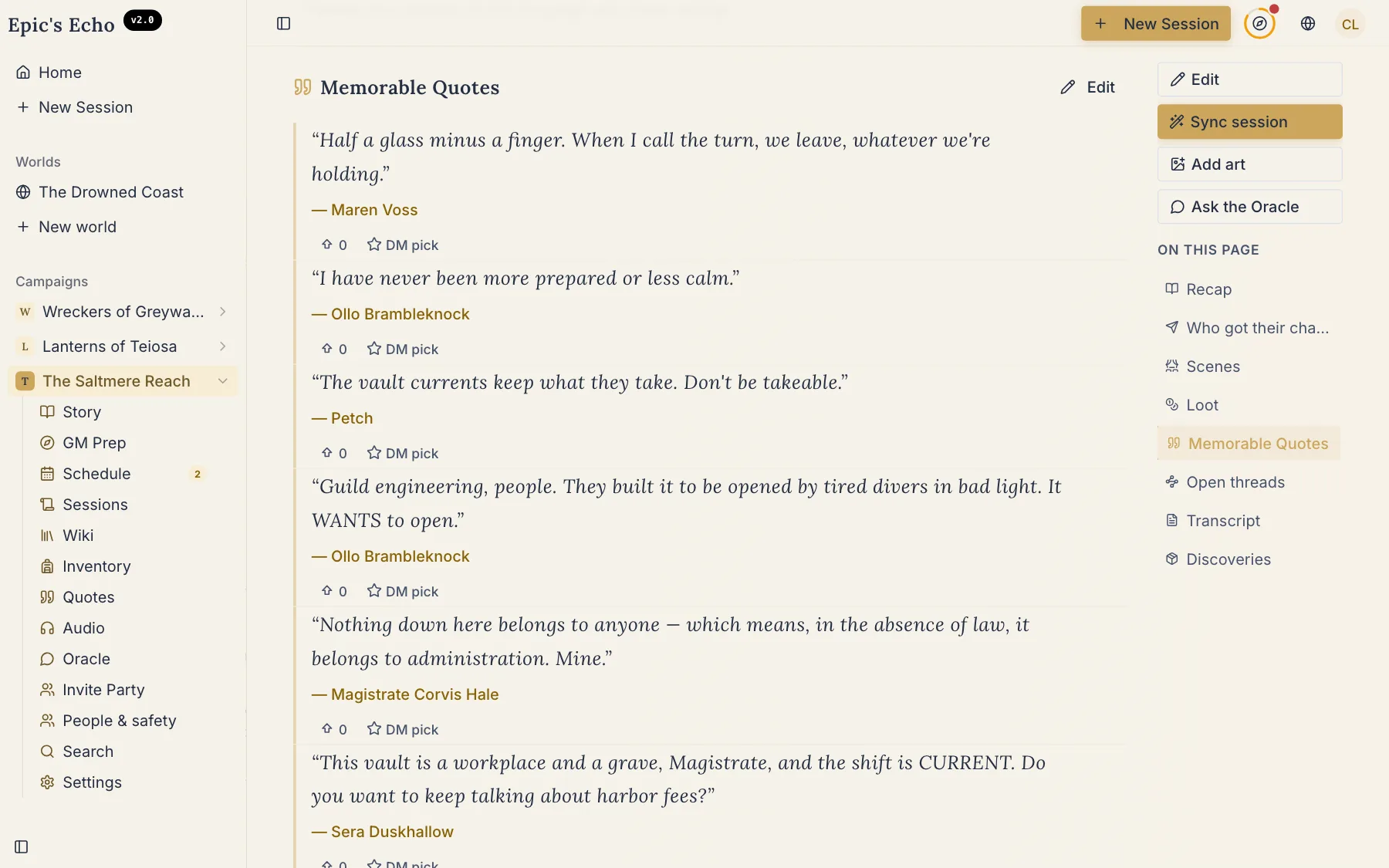
Since 2.0 in August we have shipped more than three hundred changes. Most of them had one goal: when you upload a session, what comes back should read like the evening you had — the right names, the right voices, the threads still open. We keep building the most accurate notetaker for your table. Here are the five changes you will notice at the next session.
Every line, signed
A week later nobody remembers who promised the guildmaster a favor, or who said the line the whole table laughed at. A recording knows what was said; it never knew who said it.
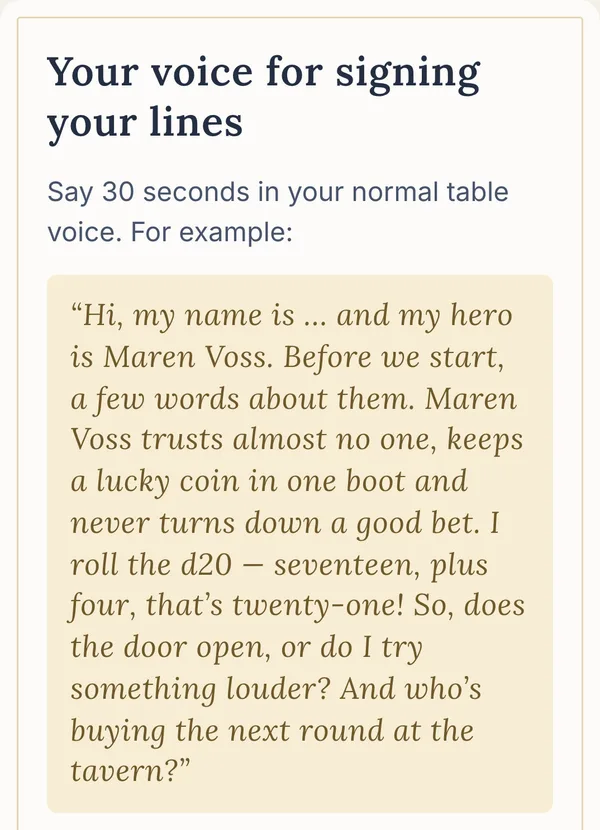
Now each player records thirty seconds of their normal table voice. From then on the transcript, the quotes and the recap know who spoke. When three people share one microphone, the GM answers “Who is this?” once, and the recap comes out with names. We use a voice only after its owner says yes.
Hear last session on the way over
Half the table never reads the recap. They would listen to it.
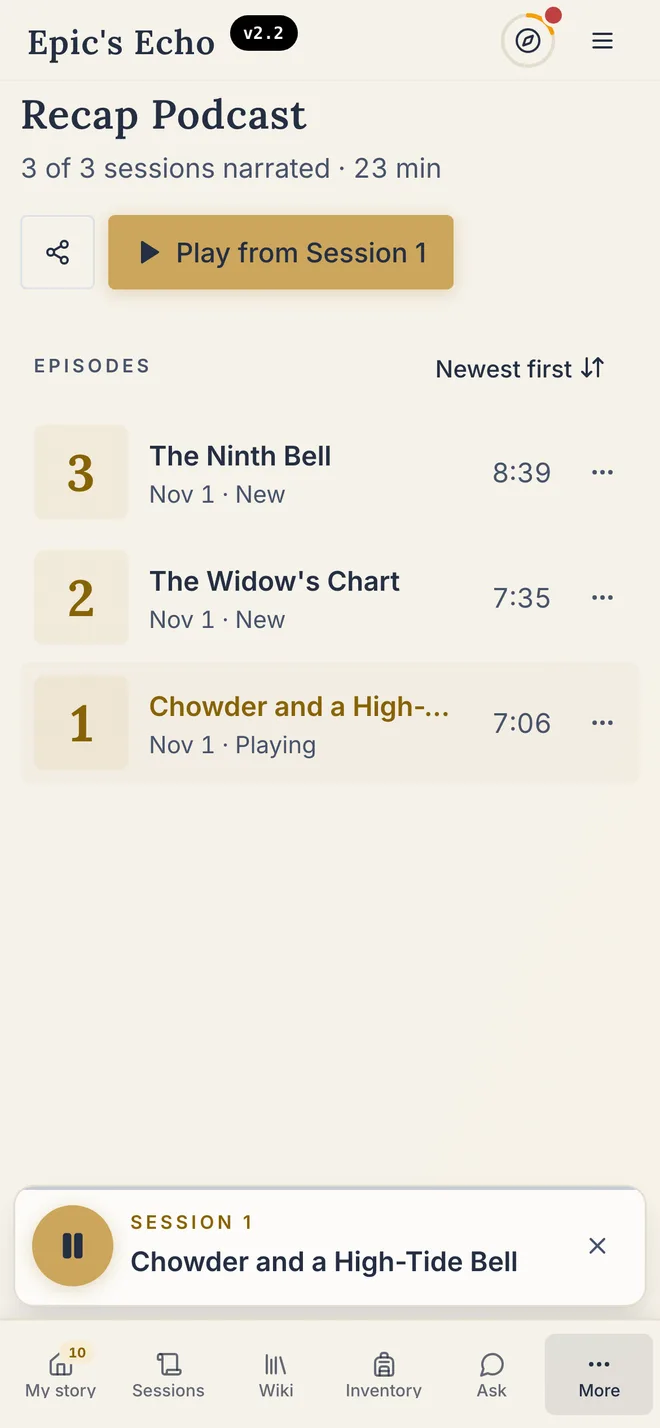
The audio chronicle is now the Recap Podcast. Every session becomes a short episode, narrated the way you played it. You set the music to Low, Medium or High and hear a sample before it renders. One player follows you across the app, with a queue that plays the episodes in order; on a phone it floats just above the menu.
Walk into the session prepared
The night before the game you scroll three sessions of notes to find what is still open.
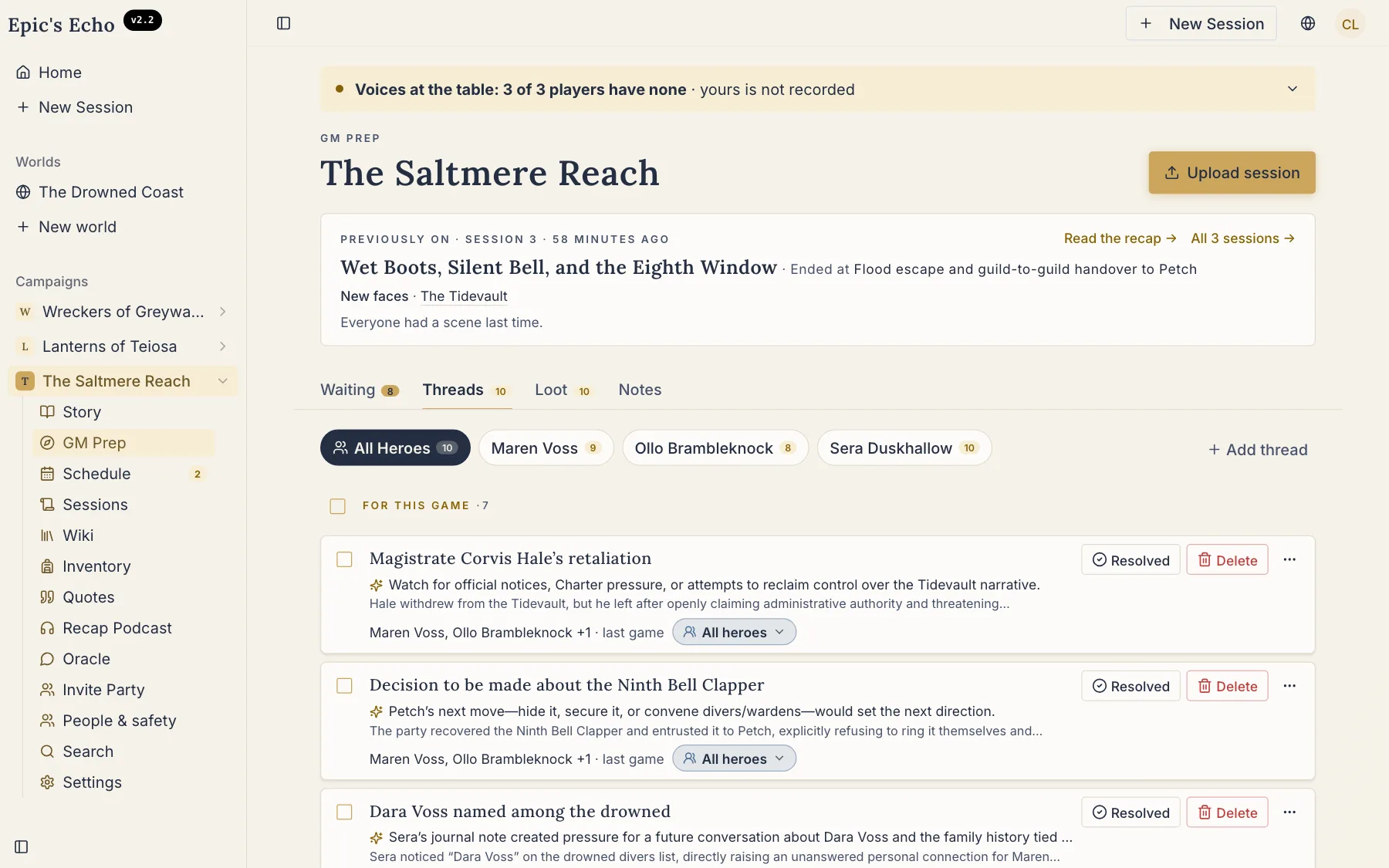
GM Prep now fits on one page. On top sits Previously on: where the last session ended and who is new. Under it, the open threads for each hero, and the few things that wait for your call — a new NPC, a duplicate, a piece of loot. Select them all, settle them at once, go to bed.
Find the date without the group chat
Picking an evening takes more messages than the session itself.
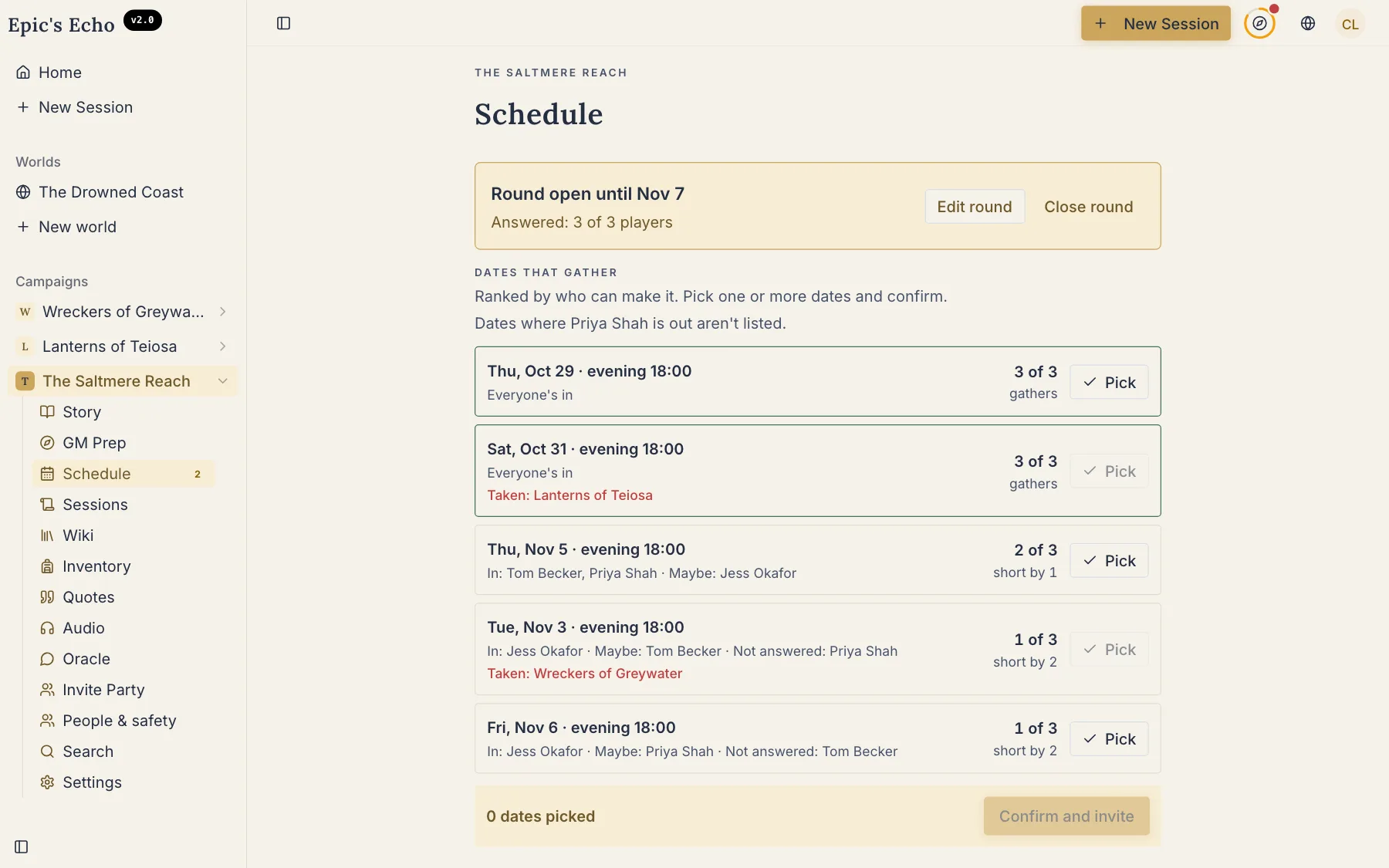
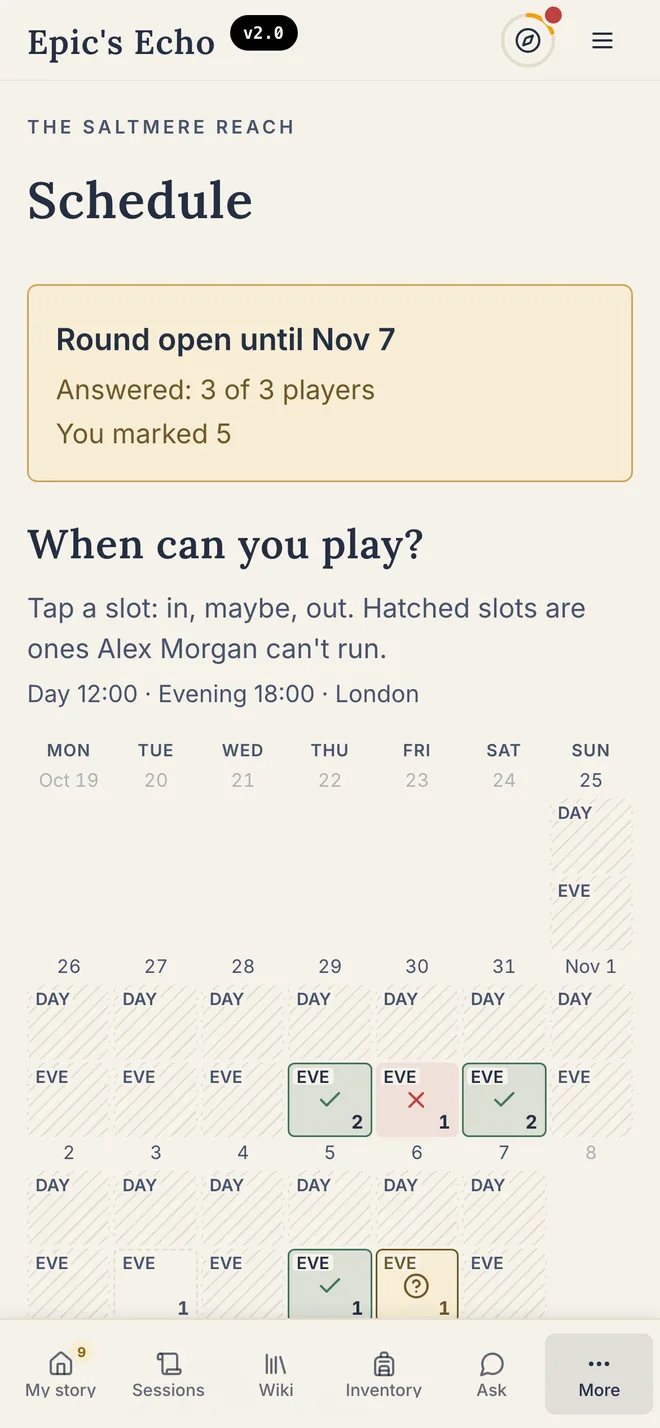
Open a round for two, four or eight weeks. Players tap the evenings they can make — on the web or right inside Telegram — and see where everyone else stands. You confirm one, and the invite lands in everyone's calendar.
Ask the campaign from the chat
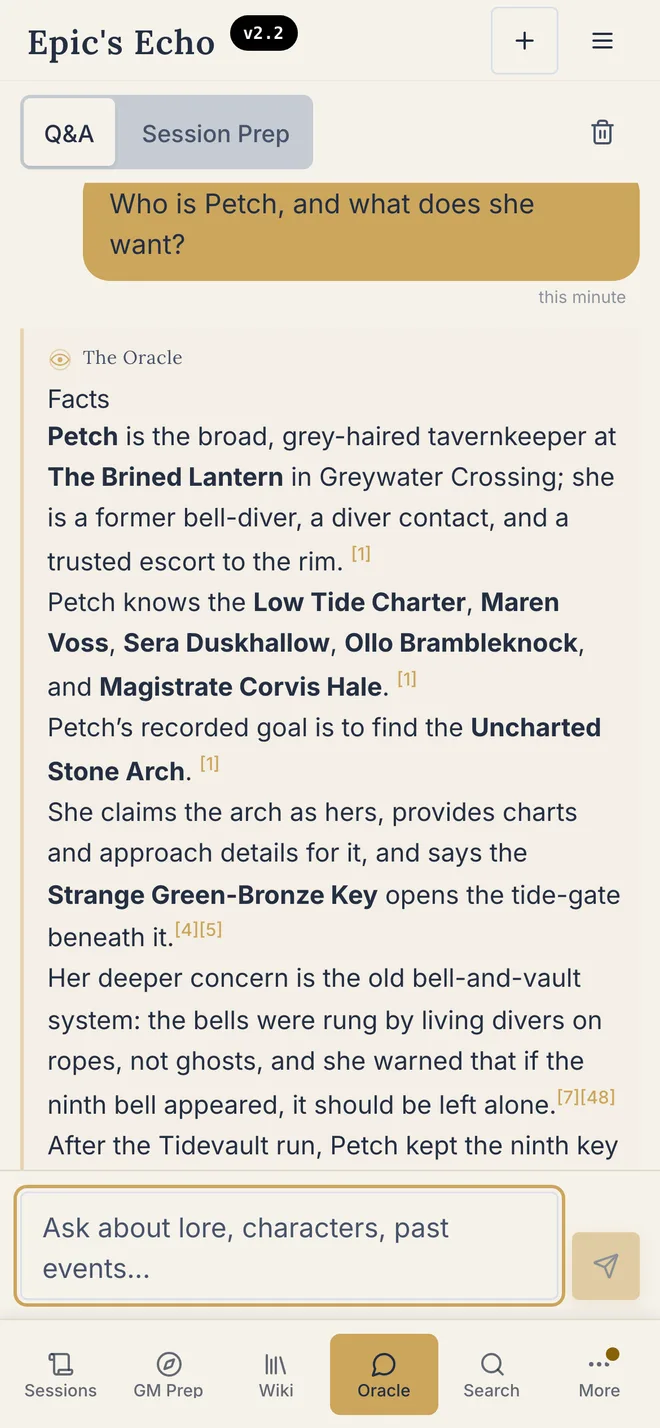
Midweek someone asks “wait, who was Petch?” and nobody answers.
Connect your Telegram group or Discord server to the campaign. Ask a question there and get an answer that names the sessions it came from. In Telegram, a short quiz on last session keeps the table warm until the next one. Private notes and GM secrets stay out of the chat.
Also new
- Share a page by link. Show a friend an NPC or a place; they need no account.
- A home for players. Your hero, your chapter and what needs you, on one screen.
- Private scenes, your call. Show a hidden scene to everyone, or hide it again.
- Fix and Rebuild. Correct the recap in your words, or rebuild it in a second voice, As Played.
Fix worth calling out: regenerating a session now keeps its quotes.
Full changelog (technical)
- BothBlog posts now invite you to start your chronicle
A sign-up band now anchors the foot of every release post and the blog listing — new visitors see a link to begin their chronicle; signed-in GMs land on their campaign in one tap.
- BothPrompts to start appear as you read what's new
As you read about new features, contextual invitations to start your chronicle or open your campaign now appear at the moments most likely to inspire — woven into the article itself.
- GMLink your campaign to a published adventure
Search the catalogue when you start a new campaign — Epic's Echo will recognise the world's names and locations from your very first session.
- GMDozens more sourcebooks available to link
Dozens of additional D&D sourcebooks now appear in the adventure catalogue; linking one lets the Echo reference published character names when writing recaps.
- GMAdventure linking built into the campaign name field
Type your campaign name to see matching sourcebooks suggested; choosing one links your chronicle from the very first session and holds even if you rename later.
- BothNew website shows the product in action before you sign up
Nine new sections including real screens, a pricing calculator, and pages on privacy and how to bring your own notes — all available in seven languages.
- GMDelete the recording once the recap is ready
Campaign settings now offer an option to erase the uploaded recording after the recap completes; GMs and authorised editors can also remove it from the session page on demand.
- BothClearer landing page on every screen
The homepage now says what the product does above the fold, moves the first testimonial up front, and stops clipping content on phones.
- BothLoot finds are now a group decision
After a session, each participant can take, assign, send to the treasury, or pass on any found item in one tap — no longer DM-only.
- BothRecaps respect how your character wants to be called
Pronouns set on a character now flow into recaps, chronicle summaries, and the Story So Far.
- GMFix a lore import without re-uploading it
A DM can now edit the source text of a lore import and run it again for free — no second Echo, no lost history.
- BothWhere Epic's Echo stands next to every alternative
New comparison pages show how the tool compares, with direct quotes from each competitor's own website — no paraphrasing.
- BothHero sheets suggest options from your adventure book
Subclass, class, and background fields now draw suggestions from the linked adventure book, your table's running choices, and any imported lore — no more guessing names from the right book.
- BothLoot tracking with evidence quotes is now for everyone
Every session now records what was found, who held it, and a verbatim line from the recording that proves it — ready for the table to confirm or reassign at the next meeting.
- BothHumblewood Tales and Carrion Crown options added
Hero sheets for those campaigns now show the right subclasses — Circle of the Warden, The Predator, and Leyline Magic for Humblewood; Agent of the Grave for Carrion Crown.
- BothDark mode arrives, switching automatically at night
The app now shifts to dark between 21:00 and 07:00 by default, or follows your device theme; a toggle in the menu lets you pin it to light, dark, or auto at any time.
- GMMaps are named after their place and can be renamed
Uploaded maps take their name from the chosen location — no more UUID filenames in the switcher. Any map name can be changed at any time from the map menu.
- BothInventory: bag and shelves
The inventory screen shows what each hero is carrying, split into their personal bag and what they've stashed on shelves. Players see their own view; the GM sees everything.
- GMEdit inventory in place
Items can now be adjusted directly on the inventory screen. Permissions follow the table's rules: who owns it, who can touch it, and what stays locked to the GM alone.
- GMDeleted quotes stay gone
When you remove a quote from the recap, it no longer comes back after a re-run or sync. The table's editorial choices now survive the next session's recap pass.
- BothLive demo: Saltmere Reach
The demo page now runs real product components over a fully built world — Saltmere Reach. Visitors can browse the wiki, peek at entity cards, and see how the table actually looks before signing up.
- BothPlayers vote quotes into the Hall of Fame
After each session, players can vote for their favourite lines. Any quote that earns two votes is permanently saved to the campaign's Hall of Fame for everyone to revisit.
- GMDM can pin any quote to the Hall of Fame directly
Campaigns with only one player account can still build a Hall of Fame. One tap pins any quote straight in without needing votes from others.
- BothQuotes tab now splits into Hall of Fame and full archive
A new segment switches between the Hall of Fame view and a full archive; the session filter narrows both at once. Vote counts also appear on each hero's own page.
- BothThree votes per session, all stackable on one quote
Every table member gets three votes to spend each session, and all three can go to a single line. Tables with only one player account can now earn Hall of Fame entries too.
- BothVoted quotes rise to the top of the quote feed
Quotes that earned votes or a DM pin now appear before the rest of the session feed, so the table's favourite moments are easy to find without scrolling.
- BothHall of Fame becomes a carousel, archive becomes a grid
The Quotes screen now leads with a full-width Hall of Fame carousel and keeps the full archive in a compact grid, with a counter showing how many entries remain.
- GMEntity cards now fill their descriptions from session notes
Cards with session material to draw from now receive a description automatically. When a card stays empty, the GM sees a reason: no source found, nothing to extract, or the description was cleared.
- BothMark what happened to each piece of loot
Tap ⋯ on any item to mark it spent, lost, or transferred to another hero or the party treasury. Items are also tagged by their proper type — Weapon, Potion, Armour — using your game system's own categories.
- BothTag factions right on the upload screen
When you record a session, you can now mark any name as a faction — not just heroes, NPCs, locations, and items. Epic's Echo creates a separate wiki entry for each faction you declare.
- BothRussian players get a landing page written for them
The Russian version of the site now has its own story — different headline, different promise — shaped by what Russian GMs actually say about the work of recapping.
- BothThree honest answers now live on the homepage FAQ
If someone at the table asks whether the tool writes the story for you, whether recording needs everyone's agreement, or what happens to campaign data, the homepage now has direct answers.
- PlayerPlayers manage their own hero's inventory
Once the DM confirms which character belongs to a player, that player can add, edit, and move items in their own hero's bag without needing editor access on the campaign.
- BothThe table votes for the quote of the night
After each session an email goes to every player with three quotes to vote on. The winning line appears in the DM's prep for the next session, ready to open the night with.
- BothRussian visitors see the tool working in Russian
The product showcase on the Russian landing page now draws from a real campaign run entirely in Russian — real recaps, entity cards, and loot — not a translation of the English demo.
- PlayerAsk the Oracle from the player app
Type a question and the app searches your campaign wiki instantly; send it on to the Oracle for a streaming answer that knows which hero you're playing.
- BothConnection map hides noise, shows what matters
Connections like "related to" with no explanation are hidden by default; a chip shows how many are tucked away, and one tap restores them all.
- GMConnection Map: DM Hierarchy Controls
Drag, accept, or reject suggested groups on the connection map; hide noisy clusters; and reassign a location's parent to the correct place with a single command.
- GMUpload Size Warning for Large Sessions
When multiple audio tracks add up to over 1 GB, a line under the credits count shows the total size and recommends keeping the tab open; over 4 GB it warns the upload could run for hours.
- GMCampaign Settings Get Their Own Page
Campaign settings have moved from the GM Prep tab into a dedicated page in the sidebar and mobile menu. Old bookmarks and in-app links still work.
- GMGM Prep: Tonight's Threads in One View
A new Tonight tab inside GM Prep lays out the five hooks the tool chose for this session, each hero's threads, suggested locations, and proposed loot before the first roll.
- GMMark Clues as Delivered, Review After the Game
Tap a checkbox on any hook card to mark a clue as delivered mid-session; after the game, a new block shows what you handed out, resolutions to consider, and new entities or loot to confirm.
- BothConnections get a new Structure view
A new Structure tab draws entity connections as a collapsible hierarchy. The DM groups, approves, and hides branches; players see their hero highlighted. Type chips can trim a 90-node tangle to 24 readable nodes.
- GMCampaign health at a glance in GM Prep
A new Campaign tab shows five health tiles — unthreaded heroes, stalled quests, and pending inbox decisions — plus a filterable thread registry you can bulk-manage without leaving Prep.
- GMPin threads to Tonight and ask Oracle from the card
The DM can hand-pick any hook for Tonight's sheet; pinned threads show with a badge and lead the list. An Ask Oracle button on each card opens planning chat prefilled with a question about that thread.
- GMKept threads step aside until the table meets again
Choose 'Keep in play' in the Prep inbox and the thread leaves your decision stack until the next session. The count now only shows what's genuinely waiting.
- BothMemorable quotes on every character card, sorted by session
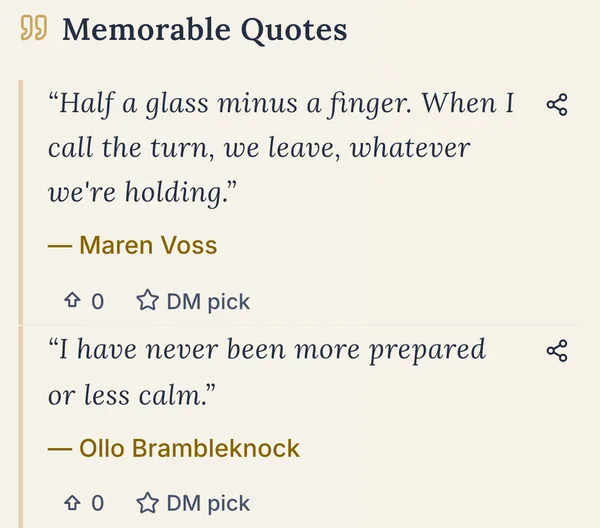
Each character's memorable lines now appear on their card, grouped by the session where they were said — the speaker's current name, a link back to that session, and a Share button that works on phones.
- BothName aliases now link to the right character in prose
Character aliases and declined name forms now highlight in the story recap — if your entity has a nickname or appears in a different form mid-sentence, the link still lands on the right card.
- BothEpic Echo Now on iPhone
iPhone app is live: install from the App Store, sign in with Apple, and tap a push notification straight to your session or character page.
- GMGM Controls Who Sees Each Hook
Choose whether a hook goes to the whole party, a specific hero, or stays DM-only; the Inbox flags any undecided hooks before the next session.
- BothConnections Grouped by Character
An NPC's ties now show one card per character, with all the relationship verbs as chips — no more three rows for the same pair.
- PlayerHero Path shows sessions confirmed at the table
The Path tab now reads from a single server feed — sessions you confirmed, entries where your character appears, and personal notes visible only to you. The session count now matches what your profile shows.
- BothPhotograph a page to import lore or a character sheet
Snap a photo or upload a scan and the text appears for your review before anything is saved. Notes flow into lore; a character sheet fills your hero's items and empty stats without touching what you've already written.
- PlayerHero journal updates itself after each session
Every hero's journal now adds new facts and the source quotes that back them up automatically after extraction finishes — no DM action needed.
- BothSession digest arrives in Telegram with actions
After a session closes, your Telegram group receives the session title, a short recap, and buttons to vote on a standout quote or act on shared loot.
- GMRelationship evidence builds entry by entry
Each connection now logs evidence one encounter at a time, tagged to the session it happened in, so every relationship's history grows rather than overwrites.
- BothOracle Answers Questions in Your Campaign Group
Your campaign's Telegram group can now pose questions to the Oracle. The DM grants access per member, and every answer is grounded in what your table has recorded.
- GMCharacter Sheets Attach to the Hero, Not the Feed
Uploading a character sheet now adds it directly to the hero's card instead of appearing in the campaign timeline as a lore import entry.
- GMMerge Card Warns About Access Changes Before You Commit
Before you merge two hooks, the card now shows exactly who will lose the ability to see the thread — no silent access narrowing after the fact.
- BothSheet imports now recognize official D&D gear
When you import a character sheet, items are matched against the published D&D catalogue — magic gear is marked unique, potions stack, and recognized pieces arrive with their official description.
- BothPrep backlog count follows you through the app
A badge in the sidebar, nav bar, and Prep tab shows how many hooks and loot gaps still need a decision. On a player's home page, a block lists everything waiting for them — grouped under their hero.
- GMLore drops in one zone — no source toggle needed
The wiki upload no longer asks how before you've chosen a file. Drop in text, photos, a PDF, or an Obsidian vault and the page figures out the format. Vault archives show a note and folder count.
- BothReminders arrive where you are — Telegram, push, or email
Work waiting at your campaign table now arrives via Telegram that evening, a push the next day, and an email two days later; the nudge stops the moment you clear your queue.
- GMUnclassified cards now show up, merge, and get typed
Cards the Echo couldn't place now show "Needs a type" instead of a raw key, stay visible in the wiki, can be selected for bulk merge, and gain a Set type button on their page.
- BothQuiz your players on lore before each session
Run native Telegram quiz polls between games, drawn from your wiki and recaps. Players earn a point per correct answer; results arrive the morning of next session.
- BothClassic gear descriptions fill in automatically
Inventory items from the official rulebook that had no description now show what they do — Potion of Healing, Thieves' Tools, and 24 others.
- GMNew names in Story Sync default to "Auto" type
When adding a name in the sync window, the type chip now starts on Auto — Epic's Echo picks the right type from the transcript, so locations and NPCs stop being mis-tagged as heroes.
- BothQuiz descriptions now lead with reward and date
When the weekly quiz poll arrives in your Telegram group, the prize and next game date now appear first, with a named invite link in place of a raw URL.
- GMOld name in entity notes flagged for review
When a character's name changes, Epic's Echo now surfaces any entity card still using the old name in its description — the GM gets an inbox question to decide whether to update it.
- GMInbox duplicates: pick the real hook, delete a thread
Duplicate hooks now show the full group at once; the GM picks which version is canonical, and any hook can now be deleted directly from the inbox.
- BothStory Sync opens with two paths before any changes are made
Choose Fix to apply a quick free correction, or Rebuild to regenerate the recap for one credit. Each door shows what will change and what stays before you decide.
- BothCampaign and Oracle now open inside Telegram
The new Mini App lets you vote on quotes, add notes, consult the Oracle and browse campaign materials without leaving Telegram — accessible from session results and the bot menu.
- BothQuiz questions now quote your table's finest moments
Lore questions can draw an exact saved quote or ask who caused a turning point. Answer first for a speed bonus; running standings show who's leading before final scores are posted.
- BothTelegram app now wears Epic's Echo's look
Campaign name, recap previews, personal settings, and quotes inside the Telegram Mini App now use the product's own colors, fonts, and layout.
- BothCrisper logo on the home screen and browser tab
The app icon, iOS home-screen icon, and browser-tab favicon are now drawn from a clean vector original — sharper on high-density screens and correctly round on iOS and Telegram.
- BothStory Sync action buttons stay on screen while you choose
The Fix and Rebuild buttons are now anchored at the bottom of the window, never hidden below the fold. Each path shows its cost and consequences as a selectable card before anything is committed.
- BothFind a time to play — the app asks the table
A new Schedule page lets the GM open a round: everyone marks which windows work, and the app highlights the slot that fits the most players. The same round arrives in Telegram with one-tap buttons — available, busy, or late.
- BothConfirmed game date lands in your calendar
Once the GM locks in a session time, everyone gets an email with an .ics file and an Add to Calendar button. The event carries the campaign name and your table's Telegram link.
- GMQuiz and GM Prep read the confirmed game date
After a game time is confirmed, the lore quiz schedules its questions around it and GM Prep's Tonight tab reflects the agreed date — quizzes arrive before the game and Prep shows the session you're actually planning.
- GMShare any campaign page as a public link
Tap Share on any entity card, recap, or session summary to get a read-only link anyone can open without signing in. Shared links unfurl in Slack, Discord, and iMessage with the campaign name and a short description.
- BothOracle tells you why it can't answer
When the Oracle declines to respond — because sources haven't loaded, a review is pending, or it ran out of context — the reply now names the reason instead of going silent.
- BothTelegram schedule now offers Google Calendar and .ics options
When the GM locks in a game time, the Telegram message now shows separate buttons for Google Calendar and .ics — one tap adds the session to whichever app your phone uses.
- GMStory Sync slides open as a panel, recap stays readable
The Update Session window is no longer a blocking overlay — it opens as a side panel so you can scroll and copy from the recap while you review changes.
- GMStory Sync pauses until unconfirmed cards are reviewed
If wiki cards still need your OK, Story Sync now stops and waits — no more accidentally syncing over entities the table hasn't reviewed yet.
- GMCampaign chat bots now open to every GM
The Chats screen shows a fleet of your campaign bots; tap any to adjust its name, tone, and avatar from the web, or detach a linked Discord channel — no beta access required.
- BothChat card gets a three-block layout; quiz results land on their own card
The in-app chat message card uses a cleaner three-part design, and quiz results now appear on their own separate card rather than inline in the message thread.
- BothTelegram and Discord bot pages now live on the site
Each page shows the campaign bot in action — real Oracle answers, quiz questions, and chat previews sourced from the bot itself, available in English and Russian.
- GMGM controls who sees each private scene
A new decision panel on the session page lets you share a hidden moment with the whole table or pull it back — each choice updates the recap for free.
- BothSign-up button now at the top of every feature page
The Recaps, Wiki, and Hero feature pages now have a sign-up button and free-trial note in their opening frame, visible without scrolling on a phone.
- GMEdit, resolve, or remove any thread from any screen
A single «…» menu on the session, hero, prep, and inbox screens gives Edit, Audience, Resolve, and Delete on every thread. Resolve and remove stay pending for 5 seconds so you can undo.
- BothEach player can record their voice for the campaign
Players record a 30-second sample at their hero card, in settings, or from GM Prep. Only the owner can play or delete their clip; the GM sees who has recorded and who hasn't yet.
- GMCard preview shows how many sessions a character appeared in
Each entity's pop-up card now shows the total sessions it appeared in and the session where it first came up, so you can see at a glance how deep in the campaign's history they go.
- GMCard previews appear on every mention; only the first is underlined
Wiki auto-links now show a hover or tap preview on every reference to an entity in a recap, but only the first mention is underlined — keeping text clean while every reference stays tappable.
- GMRemove or redirect an auto-link directly from the card preview
«Not this card» dismisses an incorrect auto-link; «Link to another…» points the same text to a different card — both actions work without leaving the page.
- BothiPhone voice recordings play in Safari and use the campaign's language
Voice snapshots recorded on iPhone now play back correctly in Safari. The recording prompt also appears in the campaign's chosen language with a clear 30-second reminder.
- GMPlan sessions weeks out with a custom start date
Create a round for 2, 4, or 8 weeks starting any date up to three months ahead — tap a weekday header to fill every evening at once, with the slot count and submit button always in reach.
- PlayerOracle answers with your open threads
When you ask Epic's Echo what your character will do next, it now lists that character's open plot threads instead of refusing — the choices stay yours, the hooks are there to read.
- PlayerClaim Your Voice After the Game
When a GM assigns a recorded voice to a player, that player sees "Is this your voice?" — one tap merges those clips into their voiceprint so every future session auto-labels their lines without a separate recording.
- BothWhen We Play, Open to Every Table
The scheduling grid is now live for every campaign — no flags, no opt-in required. Open a round, share the link, and collect availability from anyone with an invite.
- GMNo Double-Booking Across Your Tables
GMs running multiple campaigns can no longer accidentally confirm the same evening twice — the scheduler shows your own conflicts across every table before you commit.
- GMTranscript by Speaker in GM Prep
The GM can now assign each unrecognised voice to a person at the table — the session transcript then shows who said what, and a new Voices section in settings keeps the full roster.
- PlayerEmail Invite When a Scheduling Round Opens
When a GM kicks off a When-We-Play round, every player with an email address gets a link to the availability grid — no Telegram account required to weigh in on dates.
- BothSign-up button follows you down the landing page
A "Start free" strip appears at the bottom of the screen once you scroll past the hero. Tapping it jumps to the sign-up form at the end.
- GMTrack who holds, seeks, or knows a key item
Any entity can now be flagged as holder, seeker, or "knows of" for a quest item. A new card on each item shows where it is now, who's chasing it, who's in the loop, and the full hand-off history. The Oracle reads it too.
- BothNew landing pages for Note-Taker, NPC Wiki, Podcast, and Between-Sessions use cases
Five new public landing pages (including /notes) give prospective players a dedicated entry point for each way they can use the app, each with a sign-up form.
- GMRename a session from the card or its own page
The DM can type a new name and click away on the Sessions list or on the session page itself — the title saves immediately without a modal.
- BothQuest items follow the hero in their inventory
Items a hero holds appear in their own group at the top of the inventory screen; hero and NPC cards now also show what each character holds, seeks, or knows about.
- BothSession art appears above the recap
Upload up to five pictures from the session — drawn maps, character portraits, illustrated moments — and they display above the recap with a caption and full-screen carousel.
- BothWiki cards now hold up to five pictures
Add a gallery of images to any hero, location, or item card — a portrait plus four more, browseable in a full-screen carousel.
- GMLock the session number used at your table
Tap the number on any session card to set the count your table uses — earlier sessions shift or keep their numbers, and the pin lifts when you choose Count automatically.
- PlayerNew spread layout is now the default for every player
The updated two-panel player home is now live for all accounts; the legacy home layout has been retired.
- BothTwo voices for session recaps: Story or As Played
Story voice gives the literary chronicle you know; As Played captures every named spell, cracked shield, and exact bribe your table made.
- BothProcessing permission asked once at sign-in, not mid-task
The prompt to allow Epic's Echo to process your sessions now appears once at the start — it no longer interrupts a recap, a sync, or a mid-session ask.
- BothEpic's Echo on iPhone: record sessions and follow along as a player
A companion iOS app is now available. GMs can start a native recording from their phone; players open the companion view to see entity cards, quest items, and the live recap on any device.
- Both"After the Game" flow and Story Sync Patch available for all campaigns
The post-session workflow and the story correction tool are now on for every campaign — no opt-in required.
- GMGM controls auto-links from the card preview
A preview of any entity card now includes Remove and Reassign buttons for each auto-generated link, so the GM can fix wrong connections without leaving the reading flow.
- GMGM notes publish instantly
When a GM publishes session notes, they go live at once — no review step holds them back.
- BothComplete site redesign ships
Every page of the website has a new layout — landing, pricing, comparisons, mission, and a live demo campaign new visitors can explore.
- GMRename an NPC and the notes catch up
Every mention of the character in your notes rewrites itself — right name, right form, right pronouns.
- GMEverything waiting for you lands in one prep hub
Waiting decisions, active threads, loot, and session notes now live in four clear tabs — with bulk actions and undo on every batch.
- GMFilter threads by hero, select the whole tab at once
A hero filter narrows every prep list. «Select all visible» picks the full tab; undo rolls back the last bulk change — on phones, Delete lives behind the row menu.
- GMA «Previously on» card opens every prep session
The session summary becomes a single card: last recap, quote of the night, new faces, and quiet heroes — each a direct link into the relevant part of the app.
- PlayerYour chapter opens first on the player home
The recap written for your character now sits directly below your hero on every visit. A saved voice recording moves to Your table so the chapter is always the first thing you see.
- BothDiscord and Telegram bots get their own homepage section
The main site now shows what the bots do — polls, quotes of the night, quizzes, and the session reminder — with links to the full bot pages.
- BothHero chapters, session coherence, and private scenes update themselves
Hero chapters update overnight automatically. Reordering sessions fixes recap coherence on its own. Hiding a private scene now triggers a rebuild — no manual step needed.
- BothNo more «Update story» checkbox on uploads
The checkbox is gone. On the web, accepting the Terms at sign-in covers processing — no extra consent dialog. Genesis follow-up questions arrive on their own.
- BothAsk shows each search step as it happens
The search index card is gone from chat — the Oracle updates itself. While it searches, the indicator cycles through what it is doing: checking records, gathering quotes, cross-referencing sources.
- GMOpening the app takes you straight to prep, not the dashboard
Campaign owners and DMs now land directly on the prep hub when they open the app. The old campaign dashboard card and session list on the home screen are gone.
- GMPrep threads are now compact rows with a group checkbox
Each thread fits on one tight row; click to expand the description and entity pills. One checkbox above a group selects every thread in it at once, and a «Who can see» menu sets visibility for the batch.
- GMProposed closings and player flags rise to the top of Waiting
Two new groups now sit above the inbox: every proposed closing and every player flag, each counted in the Waiting badge, ready to handle before you work through threads.
- GMSort Session Quotes by Hand
In Edit mode, drag handles let you arrange the session's quotes into the order they were said; the order is saved and carries through to the archive.
- GMVoice Change Opens Story Sync
Clicking a voice name on the Narrative tab now opens the Story Sync panel, where you can review your DM notes and confirm the cost before rebuilding.
- BothVoice Recognition Learns from Real Sessions
Players can now save up to three fingerprints — one personal recording and two captured from actual games — so the Echo recognises their voice even when they're having an off night.
- BothConfirm Game Dates in Telegram
The GM now picks session dates and sends invites directly from Telegram; players see the full date list, mark their availability, and get an .ics file when a date is confirmed.
- BothAll gathered dates named in the scheduling message
When several dates suit the whole table, all of them now appear in the Telegram poll header, not just the top one; declines show as a count instead of a list of names.
- GMPick how loud the music plays in your podcast
DMs choose Low, Medium, or High background-music level before generating an episode, with a live preview of narration over music, so the voice is never drowned out.
- GMField hint tells you what the «aka» name does in recaps
The aka field on entity cards now shows a tooltip explaining that recaps write this name, not the canonical one, so keeping it close to how the table says it prevents mishearings in narration.
- BothRecap Podcast: one card, first on every session page
The session audio is now called «Recap Podcast» everywhere. A single card appears at the top of the session page and in the hub; players see it once an episode exists, the DM sees it always.
- BothA floating podcast player follows you through the app
A thin bar shows the current episode on desktop and sits above the bottom nav on phones; when the player is empty, the hub offers the latest unfinished episode paused and ready.
- BothVote on session dates in your Discord channel
Discord groups can now vote on available dates right from a channel card — same choices as Telegram, each date confirms or adjusts your availability with one tap.
- BothDiscord gets session announcements and GM messages
Once dates are confirmed, Discord tables receive a game announcement and a pre-session reminder; the GM gets a private message with calendar links and a Confirm button.
- GMAdventure names stay hidden until the DM reveals them
Names and locations from a linked published module were visible to every player the moment the campaign was created. Now they only appear when the DM introduces them.
- BothNew Session hides while the setup wizard is open
First-time setup used to leave a back door open in the sidebar — new GMs could skip straight to uploading before their campaign was properly wired up.
- BothEntity cards skip the empty portrait placeholder
Fewer than 5% of characters, locations, and factions have a portrait — the rest used to show a blank frame where the picture would go. Now the space only appears when there is something to show.
- BothApp always opens on the latest version
After each update, the app silently refreshes in the opening seconds so you always land on the newest version without a manual reload.
- GMStory summary updates reliably after sessions end
The Generate Description button now stays hidden until a completed play session exists, and the summary refreshes correctly once you have one.
- BothMobile session controls no longer overlap on small screens
On phones, the session navigator and the Actions button stacked on top of each other; they now sit one above the other with a clear gap.
- GMInventory no longer shows a misleading loot count
The 'Awaiting Review' counter in campaign inventory was counting deleted and duplicate loot entries, not real items pending a decision. It is hidden until the loot review feature is ready.
- BothHero wealth totals now add up correctly
Currency amounts extracted from transcripts were stored under the full name rather than the system key, so gold pieces never added up in the wealth total — now they do.
- BothHero Path no longer loses chapters between sessions
A bug was silently wiping a hero's full Path whenever a later session mentioned them; chapters are now preserved.
- GMRecap language and card names now stick
The recap language chosen on upload now saves for the campaign; quest, monster, and faction cards can have their display name edited inline.
- BothParty gold no longer splits into duplicate totals
Gold, silver, and other currency tracked under different spellings — or across session languages — now consolidates into one running total per denomination instead of creating parallel counts.
- BothShort loot evidence is now flagged for table review
Quotes under 45 characters are too short to locate in the recording with confidence, so the card now prompts the table to check rather than claiming the moment was found.
- BothLanding page updated with honest, backed-up promises
The homepage headline and the ledger section were rewritten around what the wiki's learning loop actually delivers; claims that couldn't be backed were removed before they could mislead a new visitor.
- BothSignup page panel is back to its intended dark look
The panel beside the sign-up form had gone light when its theme was removed; now back to the intended dark surface, with icon-coded chips explaining what the table keeps, reviews, or cuts.
- PlayerHero Path chapter numbers now match the live session order
For sessions a player did not attend, the chapter in their Path now shows the actual current number instead of the stale value written when the chapter was first extracted.
- BothOne item, one row — even in two languages
Potions and loot extracted from Russian-language sessions no longer appear as duplicate rows in heroes' inventories.
- GMSession hints stay while the page refreshes
Text you type into the session guidance box no longer clears itself when the app refreshes quietly in the background.
- BothOracle answers no longer cut short
Full responses now reach the screen instead of stopping mid-sentence. Saved notes also keep their full text after you save them.
- BothOracle chat works on phones
Asking the Oracle on a mobile device no longer gets cut off by the keyboard appearing. If a response didn't load, the screen says so — no more silent blank.
- PlayerHero page respects privacy
Quotes on a hero's wiki page now follow the same privacy rules as the session recap. Hidden sessions no longer leak lines through the character's page.
- BothSign-in page guides you when the email doesn't arrive
When a sign-up email does not arrive, the page now names the most common cause — a spam folder or corporate mail filter — and says what to look for or ask your IT team.
- GMLarge sessions no longer silently drop their entity cards
Sessions with long transcripts were sent to entity recall all at once, causing the response to cut short on longer evenings. Cards now arrive for every session regardless of length.
- GMRussian entity names now appear in their correct base form
Entity names were being saved in whatever case the prose used — «Луне» instead of «Луна», «Дракенхейма» instead of «Дракенхейм». Cards now normalise to the nominative form.
- GMEmpty entity cards no longer show a placeholder line
Over a hundred cards were carrying a "No description available" label the app itself had written. Empty cards now stay blank; a description appears only when there is actual content.
- BothEmpty Hall of Fame no longer collapses the quote feed
Opening the Quotes tab before any quote reaches the Hall of Fame no longer hides all quotes. The full feed stays visible until the first Hall of Fame entry is earned.
- BothQuotes no longer wear double quotation marks
Some quotes were arriving wrapped in an extra set of quotation marks — visible in recaps, letters, and on sharing cards. The outer layer is now stripped before anything is saved.
- BothEach of a player's heroes now has their own bag
When one player runs two heroes, each hero now gets a separate bag panel. The transfer dialog also limits its list to valid recipients, and converting a wiki card moves it to inventory instead of leaving a copy.
- BothRussian pricing and home pages now fully translated
Eight previously English-only labels on the pricing page now show in Russian, and both page titles — missing from all languages — now appear correctly in the browser tab.
- GM"Not Duplicates" decisions now stick
When the GM marks two characters as not the same person, the nightly merge job now respects that call and keeps them separate.
- BothMechanical events tab now shows results
The tab that tracks dice results, status shifts, and other in-session moments was silently discarding every result. It now works correctly for all sessions.
- GMStory So Far updates from the latest recap, once
The Story So Far now generates a single time after each session sync and always reads the most recent recap — previously it could run two or three times and occasionally read stale notes.
- BothFailed uploads now show a clear error with options
When a recording fails to transcribe, the session now shows a clear error prompt instead of an endless progress spinner. Spent Echo is refunded automatically.
- GMLore uploads no longer generate phantom loot
A lore-only upload now skips loot and mechanical-event extraction entirely. A duplicate lore file refunds your Echo automatically and clears the spinning status.
- BothSpecial characters in campaign names no longer break emails
Campaign names that include symbols like & or < were arriving garbled in welcome and recap emails. They now appear exactly as typed.
- BothEmails now use the right quotation marks per language
Campaign emails open quoted lines with the correct marks for the reader's language — guillemets for Russian and French, angle-quotes for German, curly marks for English.
- BothOpen-hook emails in Russian now read naturally
The heading listing a hero's open hooks in Russian used to name the character after «у», requiring the genitive case — but most transliterated names don't decline. The heading now reads naturally for any name.
- BothSession audio email now speaks your table's language
The audio notification email arrives in your campaign's language, leads with the audio player instead of the recap summary, and the link drops you right at the player.
- PlayerAsk screen works smoothly on phones now
The Ask input stays at the keyboard edge, the sheet doesn't jump while you type, and swiping between results no longer tugs the whole page.
- BothCampaign Chat Shows Notes as Sources
When the campaign chronicle includes notes, those notes now appear correctly as source citations in the chat history; previously a note citation caused an error that broke the history view.
- PlayerPlayer Emails Now Link to Your Home Feed
The daily player digest now lands you on the home feed instead of the last session page; a loop that sent some players bouncing between two pages on first open is also resolved.
- BothRestricted Content No Longer Leaks in Emails
Players invited by email only could receive restricted entity names in their digest emails. This gap is closed; co-master access via email address also works reliably regardless of capitalisation.
- GMManual Session Names Stick When Reordering
Session names you typed yourself no longer revert to the generated title when you drag sessions into a different order on the campaign timeline.
- GMEmpty Connection Groups Are Now Refused
Creating a connection group with no members now returns a clear error instead of saving an empty group that has no way to add members later.
- BothOracle always answers in your table's language
Asking the Oracle in Russian, French, or German no longer pulls an English refusal. The Oracle now matches the language of the question, with refusals phrased naturally in each supported language.
- BothRecap audio links in email land on the right recording
Opening the audio recap from an email takes you to the exact session, even through sign-in. Outlook email clients get dedicated listen links they can render reliably.
- BothNarrative recap is now the default view
Open a session recap and it opens on the Narrative tab — the full story of what happened at the table. Your own recap style preference is still honoured.
- BothEntity card quotes group cleanly by session
Each session's quotes now share a single rail, spacing is consistent down the list, and the Share button is visible with a tap — no hover needed on touch screens.
- GMRecap refresh now shows when the new version didn't make it
When a regenerated recap arrives too short or empty, you now see a clear explanation and your credit is returned automatically — no more silent 'Saved' while the old recap quietly stays.
- BothLocked Portraits Now Look Locked
Restricted portraits are visually dimmed in dark mode; selecting entities on mobile now uses a compact bar so the list stays visible for multi-select.
- BothSign-in Works Reliably in the iOS App
The Google sign-in button is gone from the native app since OAuth doesn't complete in a webview; magic-link emails now open the app directly.
- PlayerSessions Button Now Opens the Right Screen
Tapping Sessions in the sidebar now opens the campaign's session list for players — previously it redirected to My History, which players couldn't access.
- GMHook Merge Cards Temporarily Hidden
Thread-merge suggestion cards in the GM Inbox are hidden until the audience-aware merge is built; entity clusters are unaffected.
- BothSession Numbers Correct in Connections
Relationship evidence now shows the real session number; campaigns with lore imports were inflating the count because imports were counted as sessions.
- PlayerHero chapters no longer claim you were absent
If the DM recorded you present but the recap barely named you, your chapter used to open saying you were absent. The attendance record is now the only source of truth.
- BothA negative balance in inventory can now be closed
The red 'Doesn't add up' bar now offers two ways to resolve: record income you forgot to log, or flag a wrong entry and send it back for review. Either way, a new line is written — nothing is deleted or backdated.
- GMTreasury splitting no longer breaks on potions or items
Items that aren't currency now split by transfer. Dead or departed heroes no longer count toward the split total, and when the sum won't divide evenly the dialog explains why rather than going silent.
- BothFillable character sheet PDFs now import correctly
D&D Beyond and similar fillable PDF forms now capture all your entered values rather than just blank label text; the import review also shows your answers before the field names.
- GMLoot Regeneration No Longer Crashes Mid-Session
Regenerating a session's loot no longer fails when the model reuses an item name that existed only in that session — a prod error that was silently affecting multiple tables.
- GMSpelling Suggestions No Longer Pre-Approve Themselves
The name-matching banner now explains what will change before you confirm, presents options unchecked, and remembers your answer through re-runs so nothing is silently redecided.
- GMHook Inbox Works for Every Campaign Owner
A server-side misconfiguration was returning a 404 to all but one of your GMs when they opened the Inbox tab — 488 hooks waiting for a decision are now visible to every campaign owner.
- GMKeep in Game Actually Removes the Hook from the Queue
Clicking «Keep in game» on a hook now immediately removes it from the Inbox queue. Previously the change appeared to work but reverted on the next page load.
- GMSpelling Suggestions Pruned to the Plausible Few
The list of name-spelling candidates has been trimmed from a median of 22 (max 592) down to close sound-alikes only, cutting nearly 85% of noise before it reaches the DM.
- GMThread Merge Warning Now Shows in Full
The warning that a thread merge will limit who can see the result was silently cut off mid-sentence on every screen width. The full text now displays.
- GMSpelling Decisions Survive a Session Re-run
GM decisions on which name spellings to accept now have a stable identifier and persist when the session is reprocessed, instead of being silently discarded.
- GMSession Re-runs No Longer Produce Duplicate Hooks
Re-processing the same session was generating a second copy of every hook extracted the first time. Duplicate detection now blocks these at extraction time.
- GMInbox Catches Hooks Hiding Inside Other Hooks
The duplicate detector now flags hooks where one title is a subset of another — 76 such pairs across 19 campaigns were previously slipping through to the table.
- BothTelegram Linking Shows Its Result
The confirmation button and waiting screen now update immediately when your Telegram link succeeds or expires, instead of staying frozen.
- GMWiki Card Privacy Settings Now Stick
A card you marked private or restricted to one player no longer gets silently reset to public when the next session recap processes.
- BothOracle Gives the Same Answer Everywhere
Web and Telegram now draw from the same current source material, so the Oracle stops returning conflicting answers about the same location or character.
- BothAsk the Oracle by Mention or Edit
Trigger the Oracle in Telegram by mentioning the bot or editing your message to add /ask — players without accounts see a sign-in button instead of silence.
- GMMerging Duplicate Threads Now Saves
When you merge a pair of duplicate threads in the inbox, the result now sticks — the merged card no longer reappears after switching tabs.
- BothTelegram Oracle Delivers Answers with Caveats
When the Oracle cannot fully verify an answer, it now sends the response with a brief uncertainty note instead of replacing it with a generic fallback.
- BothTelegram Oracle No Longer Runs Out of Room
The Oracle now picks the sources that fit the question before it answers, so it no longer refuses when your campaign has many notes.
- BothSheet items confirm again — accept all with one tap
Items pending from a character sheet import can be confirmed, rejected, or accepted all at once — the confirm button works again, and a new 'Put all in the bag' shortcut appears at the top of the queue.
- GMOracle stayed silent after an unusually long answer
A DM whose Oracle chat history included a very long reply found every follow-up question blocked since late July; that barrier is now cleared.
- GMOwner sees Edit and Sync when playing their own table
A campaign owner sitting as a player can now see «Edit session» and «Sync session» again. Corrections written in the Story Sync hints now take precedence over what the transcript says.
- BothCampaign name and system badge share the line cleanly
Long campaign names on the upload screen now take the full available width instead of being cut short beside an empty gap; system badges like «D&D 5.5e (2024)» stay on a single line.
- GMRejected cards no longer block renaming or retyping
Renaming or retyping a card no longer fails when a rejected duplicate holds the same name — the conflict clears, and remaining clashes explain themselves instead of showing a generic error.
- GMPending DM invite no longer blocks sync or type changes
A table where the DM was invited but hasn't logged in yet no longer locks the owner out of Story Sync and "Set type" — both work normally, and access errors now explain what went wrong.
- GMStory Sync corrections no longer vanish silently
Typing hints into Story Sync and hitting Save & Regenerate sometimes left the recap unchanged — the new version was discarded behind the scenes. Now it saves.
- BothHero chapters update after each recap correction
After the DM regenerates a recap, each hero's personal chapter now reflects the corrected version — not the one it replaced.
- BothCampaign screen loads faster, server errors gone
The campaign list was loading three times per visit, and every unopened quick-edit card quietly fetched data in the background. Both are fixed.
- BothFirst-upload screen now has an exit
The onboarding wizard's upload step now has an "Upload later" button. Choosing it records your chosen path and brings you to your campaign — no dead end.
- GMSet type button only shows for the DM
The button to set an entity's type was appearing for campaign owners and editors without DM access, then refusing them. It now appears only for the DM.
- BothRecaps and chronicles always arrive now
When a recap, chronicle, or hero chapter referenced a secret thread, the whole thing was discarded. Now only the secret reference is trimmed out and the rest delivered.
- GMSkip & Regenerate actually regenerates
The "Skip & Regenerate" button in Story Sync was not applying saved DM hints when session notes hadn't changed. It now always runs a fresh recap.
- GMGM Prep skips dead and inactive heroes
The Spotlight section and hero counts in GM Prep no longer include characters who have died or left the party — the view shows only who is actually at the table.
- GMHook card title and badges no longer overlap
On hook cards with a long arc name, the title and status badges now wrap cleanly below it instead of collapsing into one another — readable on every screen size.
- BothArchive list is now scrollable on mobile
The Archive panel's rejected entity list was cut off on phones — it now scrolls normally, with the close button staying anchored at the top.
- GMDeclared name that already exists links to it cleanly
When you declare a name that already lives in the wiki under a different type, Story Sync now links it to that record instead of crashing — the recap continues and the existing type is kept.
- GMStory Sync delivers the recap even if entity update fails
If entity extraction hits an error, the recap still lands and a warning tells you what to fix next — no credit is lost and the sync is not a dead end.
- GMRetry extraction button is back
When character discovery fails after a session upload, you can now retry it from the session page — your previous decisions about entity cards are preserved.
- GMHook visibility chip on every resolved thread
The GM can now see and change who has access to a resolved hook directly from the hook card — the broken visibility toggle that had no effect has been removed.
- BothQuiz generator no longer repeats old questions
When generating a new quiz, Epic's Echo now explicitly excludes previously published questions from the evidence pool, preventing repeated facts from blocking fresh quiz delivery.
- BothWeekly quiz resumes after incomplete Telegram update
A Telegram poll update that omitted the answer field no longer blocks future quizzes from generating — the schedule now recovers correctly.
- GMOld name card shows the right character's name
The inbox card for an old-name correction now shows the character whose name needs fixing as the title — not the unrelated character whose description happened to mention the old name.
- GMSpeaker picker: GM option added, rejected entities hidden
The GM can now select themselves as a speaker directly from the speaker picker; manual speaker edits are preserved across syncs; and rejected test characters no longer clutter the list.
- GMRegeneration no longer wipes existing quotes
Quote candidates now accumulate across regenerations instead of resetting each time; DM lines are attributed to the GM and capped so they don't dominate the quote pool.
- BothQuiz questions are now spaced one or two days apart
The lore quiz scheduler used to occasionally wait three full days between questions; it now sends each question one or two local calendar days after the last.
- GMMerging a thread that hides it now asks for a decision
When combining two hooks would narrow who can see the result, the keeper lands as Needs Decision rather than going silently hidden — the GM gets an inbox card to choose who sees it.
- GMRecap regeneration no longer creates duplicate threads
Regenerating a recap was producing duplicate hooks because matching against the session's own prior runs was disabled — up to 45 extra threads for one session. The match now surfaces as a Possible Repeat in the inbox.
- BothLong-history campaigns no longer block quiz drafts
Campaigns with several sessions of recorded lore could hit a size limit that silently stopped quiz drafting before the first question was written. That limit is now resolved.
- BothQuiz retries draw from fresh evidence each time
When quiz question candidates are rejected, each retry now pulls from different recorded moments instead of reusing the same rejected set — reducing silent failures.
- BothEntity warning dialog speaks your table's language
The popup that warns about unconfirmed entities before a session refresh now appears in your interface language, and action buttons in confirmation dialogs on phones no longer overlap each other.
- BothGroup Oracle gives full answers in your Telegram
Answers from the Oracle in your group chat now arrive in full — no more 'open details' placeholder when the reply fits the message limit.
- BothPrivate Oracle works with repeated exact phrases
Private Oracle answers that quote a phrase appearing more than once in your sources now complete reliably — proofs no longer fail on repeated passages.
- BothOracle answers no longer fail on locked source revisions
Private Oracle proofs were failing when the sources they referenced had been updated or frozen since the answer was generated. Proofs now bind to a valid revision and resolve correctly.
- BothOracle confirmations and refusals without source quotes now reach you
Responses that carry no supporting quote were silently dropped; they now deliver. Delivered answers are treated as final and won't be resent.
- BothImages load immediately on first visit
A cookie-consent manager was blocking CDN image requests until the visitor accepted the banner. Images now load right away regardless of consent status.
- BothShare button on entity pages is in the header, not below the name
The Share action on a wiki card has moved to the row that holds the Back button — at the top of the page — instead of appearing as a pill below the entity name.
- BothQuiz standings use dense rank after a tie
When two players share 2nd place, the next rank shown is 3rd — not 4th. Standings now reflect the actual position gap after any tie.
- BothMuted text in light mode passes accessibility contrast
Secondary labels and captions in the light theme now meet WCAG AA contrast (ratio raised from 3.1 to 4.7 against their background).
- BothQuiz answers no longer always appear in the same order
Answer choices in the weekly lore quiz are now shuffled before the poll goes out — the correct option can appear in any of the four positions, so the order of options stops being a hint.
- BothSchedule attendance counts everyone who replied
Telegram members who replied without a linked account now count toward the 'gathered' tally and 'Answered' total. New campaign schedules also default the evening slot to 18:00.
- BothShared page invite copy reads naturally in Russian
The sign-up invitation on Russian-language shared entity pages now uses natural phrasing — the title, description, and button no longer read like word-for-word translations.
- BothLore notes now appear as note cards, not entity placeholders
World notes in the Lore tab now display with type, excerpt, tags, and mentions instead of showing as generic entity cards.
- BothItem descriptions now render your Obsidian formatting
When you write item descriptions using Obsidian markup, Epic's Echo now renders them correctly instead of showing raw symbols.
- GMAmend now updates the session outline too
The Amend recap action now also corrects the session outline — before, only the recap text was patched, leaving the outline out of step with your notes.
- BothCalendar invites now show everyone at the table
The .ics session invite each player receives now lists all attendees — in your calendar, the game appears as a group event instead of a meeting-for-one.
- BothSession buttons in Telegram no longer get cut off
When a session has multiple games scheduled, each game's calendar and reply buttons now get their own row so phone users see the full text.
- PlayerYour Votes now shows the full quote with its context
The ballot in the Mini App now shows where each quote came from and correctly counts all eligible quotes — no more blank boxes or lone cards.
- BothOracle Search and Ask show the same facts; source links jump correctly
The Search and Ask views now draw from the same pool of facts. Tapping a source citation in any Oracle reply jumps to the correct passage every time.
- BothiOS search bar stays above the keyboard
The search input on iPhone no longer slides behind the keyboard when you start typing — it stays anchored at the keyboard edge throughout the search.
- BothStalled private Oracle replies in Telegram now recover
A private Oracle answer that stopped halfway on its way to you now arrives on the next try instead of hanging forever.
- GMPrivacy repair leaves lore entries in use alone
Before privacy repair hands a lore entry to a new owner, it now checks whether an Oracle answer in progress, a campaign or a player already holds it, so the repair is safe during a session.
- BothNotifications no longer vanish when the app is busy
A Telegram or email notification sent during a brief slowdown now waits and arrives instead of being dropped.
- GMThe Oracle refreshes faster in campaigns with long recordings
When the Oracle refreshes its sources, it no longer reloads the audio of every session, so large campaigns refresh faster.
- BothEditing an uncited note no longer makes the Oracle start over
The Oracle now keeps an answer until a note it quoted changes; editing any other note leaves the answer as it was.
- BothPrivate Oracle answers no longer arrive twice
Epic's Echo checks at most once a minute that a private answer reached you, so the check no longer sends a second copy.
- BothOracle answers survive short slowdowns
A brief slowdown on a busy evening no longer cancels an Oracle answer halfway; the answer finishes and arrives.
- BothApp recovers instead of spinning forever
If the app hangs on a blank loading screen, it now reloads by itself; if it hangs again, it shows a clear error with a Reload button.
- BothApp pages load reliably when offline
A missing icon made feature pages show "Something went wrong" once you went offline. Those pages now load normally.
- BothQuiz source label now speaks your table's language
The citation label under a quote-based quiz question was hard-coded in English for all non-English Telegram chats. Now it reads "Цитата", "Zitat", or whichever locale your table uses.
- PlayerPrivate Oracle answer stays after a card is edited
Editing a wiki card no longer makes a player's delivered Oracle answer disappear from Telegram. The answer is only removed if the source is deleted or access is revoked.
- BothOracle rejects drafted answers containing foreign-script words absent from sources
If a generated Oracle answer introduces a word written in a different script that doesn't appear in any source note, grounding now catches and discards it before delivery.
- BothPossessive apostrophes no longer break group Oracle answer matching
A possessive form like "Gandalf's" was causing the group Oracle to skip answer-validation entirely. The check now handles all apostrophe forms correctly.
- BothQuote with only whitespace changes now gets a verbatim source excerpt
A player's quote where only line breaks were rewritten was being rejected by grounding instead of matched — it now correctly surfaces a verbatim excerpt from the source.
- BothPrivate Oracle gathers its sources once
The private Oracle used to gather its sources twice for each question; now it gathers them once, so every answer draws on one consistent set.
- BothPrivate Oracle answers arrive fully and stay visible
Private Oracle runs now have 60 seconds to prepare instead of 27, and a confirmed answer no longer disappears when you edit a source card or a follow-up check runs.
- BothOracle delivers what it can confirm when one claim fails
When a private Oracle answer contains one unverifiable claim, the supported sentences now arrive instead of the whole reply being discarded.
- BothAsk the Oracle no longer goes silent on one bad line
Web Ask now strips unconfirmed claims and citations, returning what it can verify — one uncertain sentence no longer cancels the whole answer.
- BothOracle tells you when it's still checking the sources
After 15 seconds a «Still checking sources…» message appears with a Stop button. Each outcome — timeout, partial answer, or stopped — has its own text in all supported languages.
- BothOracle answers in the language you asked the question
Ask in Russian and the Oracle replies in Russian, even when the campaign history is in English. Status messages are now honest about partial results and lost access.
- GMLonger entity name wins over a shorter alias from another card
When one entity's full name overlaps with another card's short alias, auto-linking now assigns the longer match first — no more wrong-card links when names share a prefix.
- BothSilent voice recordings are discarded; GM Prep shows the player's hero
A 30-second recording with no captured audio is now silently dropped instead of saving an empty clip. GM Prep also shows the player's active hero name instead of a generic label.
- BothQuiz no longer makes the Oracle wait 7–9 seconds
When a quiz and an Oracle question arrive for the same campaign, they now share one look at the campaign, so the Oracle no longer waits for the quiz.
- BothCookie consent banner no longer takes over the phone screen
The Termly consent banner on mobile now uses compact text and a row of buttons instead of expanding to fill half the screen.
- BothShared links open in the app on iPhone
Tapping a shared-page or invitation link on iPhone now opens it directly in the Epic's Echo app instead of staying in Safari.
- BothGM Prep and Session Page Fit the Phone
Both pages were scrolling sideways on 390 px screens; fixed. GM Prep also now uses "thread" consistently instead of its own term.
- BothGoogle Sign-In Fixed for Returning Players
Some players who signed in with Google and had changed their email address hit a 500 error. The login now looks up your account by Google ID, so it finds you regardless of email.
- PlayerVoice Upload Shows Progress and Confirms
The Save button now spins while your voice uploads and shows a clear success message when it's done — no more guessing whether it worked.
- BothScheduling Bot Dates Now Show the Month
Round slots in Telegram now show "Fri 06.11, evening" instead of just "Fri 6, evening" — which was ambiguous once rounds could start months ahead.
- GMChapter panel skips heroes who've left the table
Dead and inactive characters no longer appear as missing recipients in the "Who got this chapter?" panel.
- BothLanding pages open noticeably faster
Pages now load in about 1.5 seconds instead of over 4, so players and GMs visiting a shared link reach the sign-up form twice as fast.
- GMOpening a scheduling round no longer waits on the email
The round now opens first and the email goes out after, so slow mail can no longer hold up or fail the round.
- GMRemoving a campaign or revoking a member no longer crashes
Deleting a campaign or removing a member used to fail with an error. Both now work.
- BothDeparted heroes no longer show up for new players
Dead and retired characters no longer appear in invitation links, the hero assignment panel, or emails asking a new player to claim their hero.
- BothGroup Oracle stats and Share link are readable
The per-group Oracle statistics panel and the Share action now display cleanly — text no longer runs together or gets clipped.
- BothOracle search updates automatically after edits again
Campaign edits and new sessions now update the Oracle's search index on their own — the Update Search button is no longer the only way to keep results current.
- BothHorror and combat content no longer blocked from sharing
Public links to campaign pages flagged for violence or graphic violence now open as expected — horror, battle scenes, and monster encounters are part of the game.
- BothOld shared links open rather than showing an error
Public share links created before moderation existed now verify themselves when a guest visits, rather than returning "This page isn't shared anymore."
- BothProcessing permission stays until you revoke it in Settings
Updating Epic's Echo's disclosure no longer resets your consent for everyone — your existing permission carries forward until you choose to revoke it.
- BothSign-in form now links to Terms and Privacy
A line at the bottom of the sign-in card links to the Terms of Use and Privacy Policy, so the agreement is visible from your first step in.
- BothStory Sync unblocks itself when a recap stalled
If a story-refresh run stalled after the recap arrived — blocking Story Sync indefinitely — the recovery sweep now closes that run and releases the lock.
- BothCampaign and session pages open without a loading pause
The brief loading screen that appeared every time you switched back to a campaign or session page is gone — it now opens without delay.
- BothiPhone recordings survive app restarts and iOS sandbox changes
Recordings started on iPhone are now recovered correctly even when the app's sandbox path changes between sessions — no more silent data loss on iOS.
- BothAutomatic steps wait for the owner's consent
Auto-story, auto-voice, entity merge, and enrichment now check whether the campaign owner has given processing permission before running — they stay quiet if consent hasn't been given.
- BothLoot card shows who already holds the item
The inbox row names the current holder before you act; failed confirmations now say why instead of a generic error.
- GMDead and departed heroes stay out of choices
Assigning a hook, picking a thread audience, and adding inventory items no longer offer heroes who have left or died.
- GMStory Sync no longer stalls when a recap lands
A recap completing no longer locks Story Sync or freezes the app on the loading screen for the rest of the session.
- BothLanguage selector added to the site header
The website now has a language switcher in the header and footer; your choice sticks on the next page, and the mobile menu no longer hides behind content.
- BothRecaps use official spell names in your language
Spells appear by their proper translated name; table slang for rests becomes the correct term in the printed recap.
- PlayerPrivate Oracle answers reliably in Telegram
Asking the Oracle by direct message in Telegram no longer silently fails right after you grant processing permission.
- BothRecap generation, quizzes, and operator scripts run again for older campaigns
Automated jobs for sessions and quizzes created before the processing-consent rollout were silently stalling; they now run correctly under the campaign owner's grant without any action needed.
- BothNotes with tables or links no longer get stuck at publish
Notes containing aligned table cells or titled links were blocked on the legacy publish path — both now go through cleanly.
- GMLoot hint no longer contradicts a current holder
A loot card that already shows a holder no longer also suggests finding an owner. A departed hero's bag stays visible but will not accept new items.
- GMSessions link from prep opens the session list
Tapping Sessions in the sidebar or phone menu from the prep hub now opens the campaign's session list — not the hub itself. A tied quote no longer stretches the hub summary.
- GMVoice row on upload reflects the campaign owner's plan
A co-DM with a premium plan could see voice options they could not use in a lower-tier campaign and received a 403. The voice row now shows based on who owns the campaign.
- GMDirector notes stick when you rebuild the recap
Every Rebuild now re-applies all director notes, including ones from a previous Fix run — corrections to names, facts, or tone no longer vanish.
- BothSite shows what the Oracle confirmed, not a blank
When a final grounding check trims part of an answer on the website, the confirmed portion now appears — a partial answer is shown rather than discarding everything.
- BothNotes publish instantly in the iOS app and Telegram
Campaign notes and hero notes sent from the iPhone app or the Telegram mini app no longer wait for a review step. They land in the wiki as soon as you publish.
- GMSession reorder button is back in the top right
The button that lets you drag sessions into a different order was pushed off screen in campaigns with 10 or more sessions. It sits in the top right again, filter pills removed.
- GMPrep tabs no longer overflow on phones with busy campaigns
The four tabs (Threads, Waiting, Loot, Notes) now fit the phone screen even when your session counts have two digits.
- GMThread Card Stays on One Line on Mobile
The thread card in the campaign hub no longer wraps hero names and the arc badge onto separate lines at 390 px — both fit in a single row.
- GMVoice Assignment Closes on First Save
The "Who is this?" panel now disappears as soon as you click Save — no more pressing the button twice to dismiss it.
- GMRe-clicking a Voice Preset Resets the Dialog
Clicking the same "Rewrite as X" link a second time now resets the voice selection and switches back to Rebuild, as it did the first time.
- BothNo Report or Block on Your Own Notes
The Report and Block buttons no longer appear on notes you wrote yourself, and notes whose author has been deleted no longer show a Block button.
- BothApp update waits until you finish choosing a file
On iPhone, tapping «Choose files» no longer triggers a silent PWA refresh that resets the file picker; the update waits until the picker closes.
- BothPasswordless sign-in redirects you to the magic link tab
Accounts created through an email invite have no password; typing one now switches the form to the Link tab with a clear explanation, instead of showing a generic error.
- BothTelegram date-poll tap tells you what the next one will do
After marking availability, the brief confirmation toast now says what one more tap will change it to, so you know the cycle order before pressing again.
- BothPoll buttons show confirmed and tentative counts
Telegram and Discord date buttons in a scheduling round now show confirmed and tentative counts separately — no more bare numbers that don't tell you what they mean.
- BothPodcast player stays below session buttons on phones
The floating podcast player now sits above the navigation bar on phones, and session action buttons clear it — neither the Actions button nor the page pager gets hidden while audio plays.
- BothGame invite explains the one-time calendar step
The game invitation email now tells players to tap Add to calendar once on the first invite — after that, Google and other calendar apps add future sessions automatically.
- BothDiscord bot page shows only what's live
The bot features page and homepage strip no longer list the daily trivia quiz as a Discord feature until the Discord bot is ready to run it.